Plugins for Photoshop, Elements, Lightroom, PSP & others
Plugins for Photoshop, Elements, Lightroom, PSP & others
|
FocalBlade effectively sharpens photos for display and print, reduces noise and produces great looking blur, soft focus and special effects. FocalBlade is ideal for sharpening and enhancing all kinds of photo, e.g. snapshots, landscapes photos, portraits as well as high-ISO shots, because it effectively sharpens and reduces noise at the same time. FocalBlade is available as a Photoshop-compatible plugin for Windows and MacOS X as well as a standalone application and Lightroom external editor for Windows. The plugin works in dozens of graphics applications, including Photoshop, Photoshop Elements, Paint Shop Pro, Photo-Paint, PhotoImpact and IrfanView. All versions support batch processing and process RGB images with 8-bit and 16-bit/channel. The FocalBlade standalone application supports JPEG, TIFF, PNG, PSD, Camera Raw and DNG image formats among others.
Edges and surfaces are sharpened independently, which means a photo can be sharpened overall without destroying the softness of areas such as sky, walls, skin and other even surfaces. The Adaptive Radius method even sharpens each image pixel with a different radius depending on its details level. FocalBlade avoids halos at high radius settings and even provides sliders for suppressing white and black halos independently. Furthermore, it allows the user to protect shadows, highlights and certain colors.
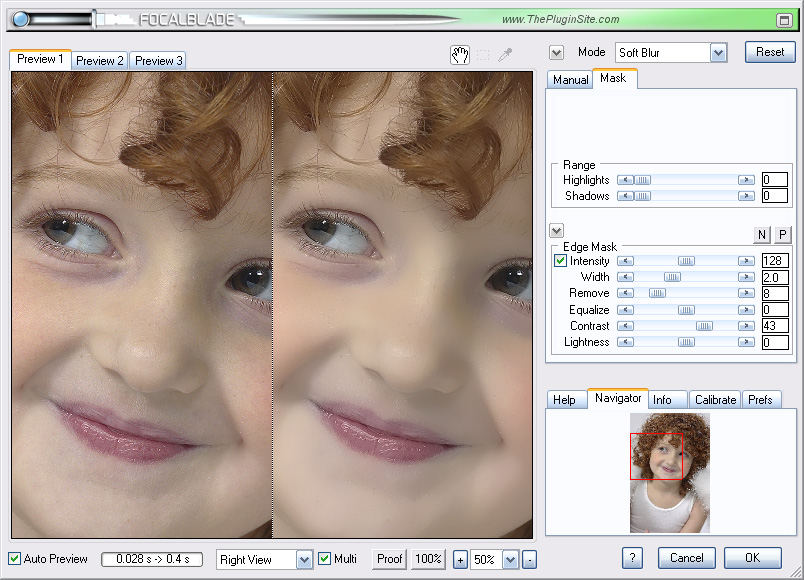
The Split View and Preview tab sheet features are great for comparing the original and sharpened versions as well as visually choosing the sharpening strength. Displaying the edge mask and sharpening halos in FocalBlade is a big help for manually fine-tuning the effect. Additionally you can apply grain to increase the impression of sharpness in low-quality images. More than 80 presets are delivered with FocalBlade and saving your own preset files is also possible. Since its first release FocalBlade has gained an entourage of thousands of photographers worldwide and established itself as probably the most popular sharpening plugin for Photoshop and other compatible applications.
It renders 10 to 120 times faster than Version 1 (depending on the used settings and CPU). It supports multiple sharpening workflows and various output devices. FocalBlade 2 is now fully scripting aware and supports smart filtering in Photoshop CS4 and CS5. FocalBlade 2 achieves better sharpening effects with less artifacts through improved edge masking and halo reduction. It now allows sharpening radiuses of up to 32 pixels. To further reduce sharpening problems three colors can be chosen to be protected from the sharpening effect. The new Softproof feature, which simulates the sharpness of prints on screen, helps users achieve satisfying sharpening results without test prints. Lab and CMYK images are processed by FocalBlade 2 without having to switch to RGB mode and back. FocalBlade also reduces color noise, adds grain, zooms the preview up to 3200%, benefits from several UI enhancements, including a Navigator tool for quickly displaying an image area, and contains many other new features.
Version 2 Upgrade: Registered users of Version 1 can upgrade for $19.95. Please contact us with your order details.
|